
Key Steps & Rules:
1. Go to Navigate  Reports.
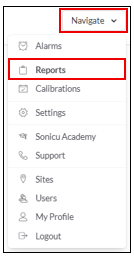
2. Select your Report:
- Select Alarm Resolution from the Advanced Reports

- Select the timeframe you'd like to include in the report
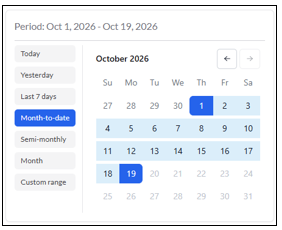
- Today – Automatically selects today’s date
-
- Yesterday – Goes back to yesterday’s date
- Last 7 days – Selects the last 7 days including today
- Month-to-date – Selects from the first of the month to today’s date
- Semi-Monthly – Select 1st-15th or 16th- end of the month
- Month – Select an entire month
- Custom Range – Select multiple consecutive days across multiple months up to 31 days
- Select Run Report

For any more questions regarding Reports, please contact Sonicu Support for assistance. Sonicu Support can be reached by email at support@sonicu.com or by calling 317-468-2345. Sonicu Support is available M-F 8 AM- 5 PM EST.